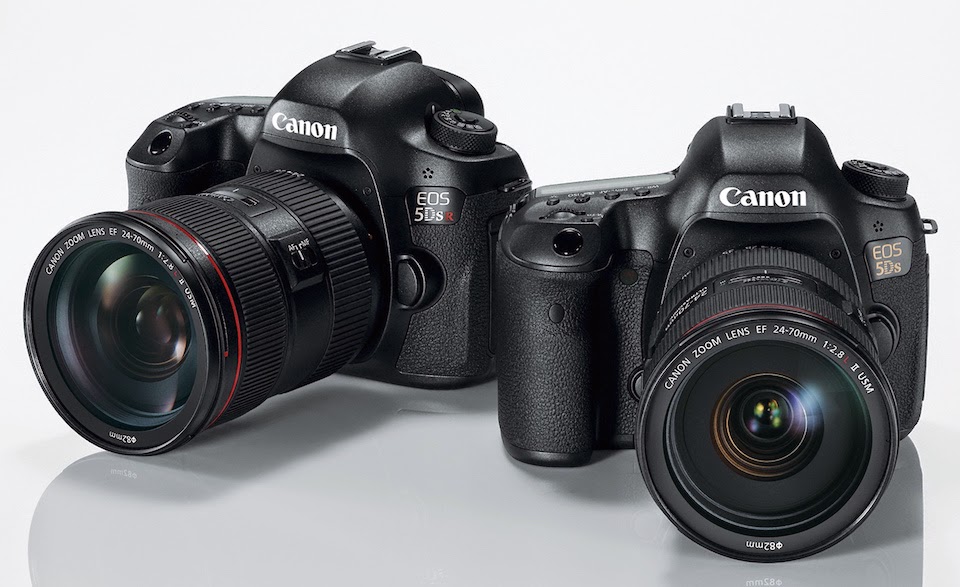
Canon announced new Firmware Version 1.1.1 for the EOS-5Ds and EOS-5Ds R cameras. The new firmware incorporates the following fixes :
Corrects a phenomenon in which shooting may not be completed while using HDR (High Dynamic Range) Mode, when certain combinations of settings are selected.
Corrects the phenomenon of Err70 which occurs with certain combinations of settings.
Corrects the level display when the camera is held in the vertical orientation with the hand grip pointing downward.
Corrects a phenomenon in which, when using certain CF cards, it may take approximately five seconds for the camera to power on depending on when the camera's power switch was turned ON.
TOKYO, April 18, 2016 - Four Canon cameras and one Canon printer were recognized with “Best Photo and Imaging Product” awards by the Technical Image Press Association (TIPA), representing 30 photo and imaging magazines from 15 countries across five continents. The five award winners are: the EOS 5DS R digital SLR (DSLR) camera, the EOS-1D X Mark II DSLR camera, the PowerShot G5 X digital compact camera, the IXUS 285 HS (PowerShot ELPH 360 HS in the Americas) compact digital camera, and the imagePROGRAF PRO-1000 professional inkjet printer.
Best DLSR Professional / High Res: EOS-5DS R
Named “Best DSLR Professional / High Res,” the Canon EOS-5DS R features an “impressive” approximately 50.6 megapixel full-frame sensor that the TIPA jury noted rivals those of larger medium-format digital cameras. The judges also highlighted the camera’s 5 frame-per-second (fps) continuous shooting of full-resolution still images and Full HD video capture at 30 fps. The EOS-5DS R is equipped with Dual DIGIC 6 image processors, a newly developed mirror vibration control system and time-release lag settings to further suppress camera shake and allow the camera to realize the full potential of its sensor. It has a 100% coverage 3.2-inch 1.04 million dot Intelligent ClearView II LCD viewfinder that can display a variety of shooting information. The jury also pointed out that the camera sports a 150,000 pixel RGB-IR metering sensor that utilizes EOS iTR (Intelligent Tracking and Recognition) AF and that AF performance is enhanced by the 61-point high-density reticular sensor.
Best Photo / Video Professional Camera: Canon EOS-1D X Mark II
Selected for this year’s “Best Photo / Video Professional Camera” award, Canon’s EOS-1D X Mark II flagship-model DSLR offers impressive specifications. The camera is equipped with an approximately 20.2 megapixel 35 mm full-frame Canon CMOS sensor and achieves high-speed continuous shooting of approximately 14 fps, and up to 16 fps in Live View mode. The TIPA judges noted that the Dual DIGIC 6+ image processors enable high-speed writing of up to 170 RAW images and 81 RAW+JPEG images per burst. Thanks to Dual Pixel CMOS AF, in which all of the CMOS sensor’s pixels include both imaging and the phase-difference detection AF functions, the EOS-1D X Mark II is capable of high-speed AF tracking. The camera features an improved 61-point viewfinder AF and an improved AI Servo III+ predictive AF algorithm, and also achieves 4K 60p video shooting, and Full HD 120 fps high frame rate image capture suitable for slow motion video capture. With the optional Wireless File Transmitter WFT-E8B, compatible with the new IEEE802.11ac wireless LAN standard, data can be sent wirelessly at high speeds across the 5 GHz band.
Best Easy Compact Camera: IXUS 285 HS
Crowning the IXUS 285 HS “Best Easy Compact Camera,” the TIPA judges declared, “Canon continues to offer pocketable yet full-featured compacts that offer many more options and higher photo quality than camera phones.” The camera sports a 12x optical zoom lens with built-in image stabilizer, a dedicated Wi-Fi button and NFC for enhanced connectivity, and a 3-inch LCD screen. It boasts an approximately 20.2 megapixel CMOS sensor and DIGIC 4+ image processor that achieves high image quality even in low-light environments. What’s more, it can capture 1080p Full HD video and, using Canon’s proprietary algorithm, can produce a “highlight reel” in camera from selected albums.
Best Expert Compact Camera: Canon PowerShot G5 X
Crowned “Best Expert Compact Camera,” Canon’s PowerShot G5 X features a 1-inch approximately 20.2 megapixel High Sensitivity CMOS sensor and DIGIC 6 processor that achieves an approximately 6 fps continuous shooting speed and Full HD video. The camera features a 24–100 mm (35 mm film equivalent) 4.2x optical zoom lens with a nine-blade iris and an aperture of f/1.8 at the wide-angle end and f/2.8 at the telephoto end that achieves rich tonal gradations and exceptional blur characteristics across the entire zoom range. The G5 X features an EVF (electronic viewfinder) with approximately 2.36 million dots and approximately 100% coverage that employs an organic EL (electroluminescent) panel and has a refresh rate of up to 120 fps. A built-in eye sensor, which has a range of approximately 22 mm, can even detect users wearing glasses and switches display from the EVF to the 3-inch vari-angle LCD touchscreen. Additionally, the camera’s hot shoe is compatible with all Speedlite flashes in the EOS system.
Best Photo Printer: imagePROGRAF PRO-1000
“Combining the ease of desktop use and a 17-inch wide cut sheet printer with many features from Canon’s higher-end pro printer models,” the imagePROGRAF PRO-1000 earned the title of TIPA’s “Best Photo Printer.” It incorporates a new twelve-color LUCIA PRO ink system, with eleven pigment inks, including the newly formulated Photo Black, and Chroma Optimizer. What’s more, Photo and Matte Black have their own nozzles, so no switching is needed between print jobs.
Equipped with the air feeding system found in Canon’s large-format imagePROGRAF inkjet printers, the PRO-1000 virtually eliminates paper skewing, regardless of paper weight and type, while also achieving more accurate ink placement. A new print head expels more ink droplets per second for more stable print performance, and print head-mounted sensors can detect clogs and automatically delegate printing responsibilities to other nozzles to prevent discoloration.
Last year, Canon demonstrated their 250MP APS-H sensor at the Canon Expo Show in New York City. Recently, at the ISSCC 2016 Conference on image sensors, Canon presented a detailed paper on their ground breaking invention.
Harvest Imaging reported on the Canon presentation : "Hirofumi Totsuka of Canon presented a 250 Mpixel APS-H size imager : 1.5 um pixel pitch (4 sharing) made in 0.13 um technology node. The device is consuming 1.97 W at full resolution 5fps. An interesting build-in feature of this sensor is the following : ALL pixel signals are converted by column SS-ADCs with a single ramp, but in front of the ADC, each column has its own PGA that can be switched to 4x or 1x gain, depending on the signal level. So when the pixels are sampled, a first check is done to look whether the signal is above or below a particular reference level, and then the right gain of the PGA is set to 1x or 4x. Simple method, but I think that the issues pop up in the reconstruction of the signal at the cross-over point between the two settings of the PGA."
The megapixel capability of this sensor will be best utilized in a full frame camera, if and when Canon decides to bring it to market.
Celebrate 10 years of Canon EOS-5D Cameras. September 2015 will be the 10th anniversary of the launch of the original EOS-5D. The EOS-5D series cameras have been landmarks in DSLR photography.
The original EOS-5D brought full frame DSLR photography to the consumer and advanced amateur market. The EOS 5D Mark II raised the bar to 21.1 MP resolution while being the first DSLR to capture 1080P HD video. Hollywood has never been the same with TV shows and major motion pictures shot using the EOS-D Mk II.
The EOS-5D Mk III again pushed the limits with a combination of high resolution, amazing high ISO performance and six frames per second. The EOS-5D Mk III also brought the EOS 5D series to new levels with 61 AF points (similar to the EOS-1DX).
Now Canon has added the EOS-5Ds and EOS-5DsR cameras that push the envelope to 50.6 MP resolution. There is a top-rated merchant on eBay selling the Canon EOS-5Ds and EOS-5DsR cameras for $2,949 and $3,499, respectively, including free shipping. Hurry, it won't last. This is an excellent deal for those who want the highest mega pixel camera on the market and crave super high resolution photography.
Join Canon at Live Learning San Francisco on August 22, 2015 to celebrate the anniversary of this amazing line of EOS cameras. The address is : 201 California St., San Francisco, CA 94111
Email Canon for more info - SanFranciscoCanon@cusa.canon.com
EOS Camera and Lenses Display and Hands-On Demonstrations
See the latest Canon EOS cameras and lenses including all of the current and past EOS 5D cameras. Canon Live Learning Instructors will be on hand to answer your questions on equipment choices or photographic techniques.
EOS 5D History Presentation (1:30 pm)
A short history of the EOS 5D line of cameras, followed by the cutting of the cake.
Anniversary Celebration (1:45 pm)
Help us cut the anniversary cake and celebrate the 10 years of the EOS 5D camera line. Door Prize drawing follows.
“Bending the Light” (3:00 pm – 4:00 pm)
We will be showing the documentary “Bending the Light,” a Michael Apted documentary that honors the artisans and craft of still and motion photography and, in particular, the glass that captures it all.
EOS 5DS and EOS 5DS R Images
Talk with Canon Live Learning instructor, Dave Henry, about his experiences with the EOS 5DS and EOS 5DS R. Dave has shot over 22,000 images with these cameras. You will also be able to examine his 35 – 24’’ X 36” gallery prints, complete with descriptive metadata.
What is provided:
Free Canon lens cloth to all attendees
Free prints from Canon PIXMA printers (as time allows, bring your image on a flash drive)
Free Anniversary Cake
Door Prizes
Canon EOS-5Ds and EOS-5DsR 50MP full frame DSLR cameras
There is a top-rated merchant on eBay selling the Canon EOS-5Ds and EOS-5DsR cameras for $2,949 and $3,499, respectively, including free shipping. Hurry, it won't last. This is an excellent deal for those who want the highest mega pixel camera on the market and crave super high resolution photography. This camera is the descendant of the original EOS-5D, announced in 2005.
You will not find a link to this eBay item because I do not accept any ad or commissioned link on my Blog or website. You can find the listings yourself, easily. I am completely unbiased in my recommendation and have no conflict of interest. You can see my works on MichaelDanielHo.com
"The Canon EOS 5DS R’s 50.6MP sensor represents a real step-change for Canon users, compared to the 22.3MP offered by the 5D Mark III. The increase in detail is striking, and improved in-camera sharpening means that it can all be delivered in the camera’s JPEG output. This does come at the cost of high ISO capability, but even at the extended setting of ISO 12,800 images are perfectly useable. This suggests that the limited ISO range available is a rather conservative decision on Canon’s part, presumably to help differentiate the 5DS twins from the 5D Mark III. Colour rendition is typical Canon, with an attractive palette in the default JPEG mode that’s saturated without being unrealistic, aided by reliable auto white balance. Dynamic range, while not class-leading, is still very respectable, with plenty of detail recoverable in the shadow regions of low ISO images. Overall the 5DS R gives exceptional images. Resolution As we’d expect from a 50MP sensor with no optical low-pass filter, the 5DS R gives remarkable results in our resolution tests. At ISO 50 it resolves very close to its theoretical maximum of 5600l/ph, although with some aliasing and false colour around this point, and plenty of false detail at higher frequencies. This impressive resolution drops only slightly as the sensitivity is increased, with 5200l/ph still attained at ISO 800, and 4800l/ph at the top setting of ISO 12800."
I will not be getting this camera because it is not the best tool for wildlife photography. Waiting for the EOS-5D Mk IV and the EOS-1D X Mk II, coming the second half of 2015. If you are interested in buying this camera, now is a good time because Canon is doubling the rebate of some 'L' lens when purchased as a companion to the EOS-5Ds and EOS-5DsR,
The Canon EOS-5Ds and EOS-5DsR cameras are beginning to trickle into North America. Rudy Winston from Canon USA, will be joined by Gregory Heisler and Larry Becker on Monday, June 15, 2015, to hold a live streaming panel discussion for the launch of the Canon EOS 5Ds and EOS 5DsR cameras.
Rudy Winston from Canon USA, will be joined by Gregory Heisler and Larry Becker on Monday, June 15, 2015, to hold a live streaming panel discussion for the launch of the Canon EOS 5Ds and EOS 5DsR cameras.
Canon EOS-5Ds and EOS-5DsR 50MP full frame cameras
Limited quantities of the Canon EOS-5Ds and EOS-5DsR production model cameras are reaching buyers who have placed their pre-orders in after the announcement.
Click here to see more JPEG and RAW photos taken with a production EOS-5Ds camera running firmware version 1.01. The glass used were Sigma ART 24mm, 35mm and 50mm lens.
I will not be getting this camera. Waiting for the EOS-5D Mk IV and the EOS-1D X Mk II, coming the second half of 2015.
Production models of the Canon EOS-5Ds and EOS-5DsR are beginning to reach buyers who have placed their pre-orders in after the announcement.
Click here to see a set of 91 JPEG and 21 RAW images taken with a production EOS-5Ds camera running firmware version 1.01. The lenses used were EF 24-70mm f/4L IS USM and EF 50mm f/1.8 USM.
I will not be getting this camera. Waiting for the EOS-5D Mk IV and the EOS-1D X Mk II, coming the second half of 2015.
My invitation will be unused because I will be away on a photo shoot
Canon will be hosting two Expositions in 2015, when the company exhibits their latest technologies in development as well as its most current products. The event is hosted once every five years. It features the latest Canon innovations and attendees will meet 'movers and shakers' of the company. Attendance will be by invitation only. The EOS-5D Mk IV and EOS-1D X Mk II will most probably be mentioned at the show, together with some interesting development projects. Keep checking back for the latest development.
Canon EOS-5Ds and EOS-5DsR 50MP full frame cameras
The Canon EOS-5Ds and EOS-5DsR cameras, announced on February 5, 2015 will be shipping from most camera stores around the world, starting the middle of June.
Canon announced the EOS-20Da and EOS-60Da in past years. It was two cameras designed for astrophotography. Now Nikon is ready to announce their own version with the Nikon D810a, a full frame camera for astrophotographers.
Depending on how successful the Nikon model will be and how well the EOS-5Ds and EOS-5DsR cameras are selling, Canon may release their own version of a full frame camera for astrophotography as well, perhaps some time in 2016.
Canon EOS-5Ds and EOS-5DsR 50MP full frame DSLR cameras
Canon announced their new camera on February 5, 2015. Delivery is scheduled to commence the end of June. If you have decided to move up to the Canon EOS-5Ds and EOS-5DsR cameras from the EOS-5D Mk III, the article here from Canon Digital Learning Center highlights how to take advantage of the 50MP files the cameras are capable of capturing. If you are still trying to decide, read this post on the added features of the new camera.
Canon Asia put out a detailed interview with the team of engineers who designed the new camera. The interview is broken into two parts. Part One is about achieving Speed, Comfort and Quality while Part Two talks about the technology behind the ultra high resolution 50MP sensor. It is quite an interesting interview and it may help those who are still sitting on the fence.
Canon EOS-5Ds and EOS-5DsR 50MP full frame DSLR cameras
Canon announced their new camera on February 5, 2015. Delivery is scheduled to commence the end of June. If you have decided to move up to the Canon EOS-5Ds and EOS-5DsR cameras from the EOS-5D Mk III, the article below from Canon Digital Learning Center highlights how to take advantage of the 50MP files the cameras are capable of capturing. If you are still trying to decide, read this post on the added features of the new camera.
We’re nearing the actual start time of delivery to dealers for the EOS 5DS and EOS 5DS R cameras (June 2015), and a lot of anticipation greets the start of sales to working pros and serious DSLR enthusiasts. Up close and personal, so to speak, I’ve seen prints as large as 4x6 ft. from files with pre-production versions of these cameras — and the results are stunning. We can go on and on about the amount of detail and texture that becomes possible at large output sizes from these files, but I’ll leave the superlatives to actual camera owners. I’m sure they’ll have plenty to say once the cameras hit dealer shelves. For starters : EOS 5DS/5DS R is at home for many types of photography! One of the most impressive aspects of these cameras is how adaptable they are to so many different types of assignments. Since their announcement earlier in 2015, many users have tried to pigeonhole them as “only for landscape shooters” or call them “just a studio camera.” Nothing could be further from the truth. I’m sure the incredible pixel resolution the EOS 5DS and 5DS R provide and the output potential they offer will be of great interest in a whole spectrum of photographic genres: Sports and action : Think about the detail potential in magazine cover shots, double-page spreads, and even banner display potential at stadiums or for marketing purposes. Either camera shoots at up to 5 fps. Put that into perspective: that’s faster shooting than the original Canon EOS-1 camera, which revolutionized sports photography when it was introduced. Wildlife : There’s potential detail in anything from a lion’s mane to the feathers of a bird, in full-frame files, and also the ability to crop into an image when you simply can’t get close enough to wildlife, yet still have information for a great final picture. Weddings and events : For those vital images that mean sales to a working pro (anything from posed formal shots to large group photos), you can work with full 50.3 million pixel RAW or JPEG images and know you have incredible detail for even the largest prints. And when quantity counts more than large file size, switch to smaller resolution files (RAW images, for instance, can be 12.4 or 28 million pixel files, at the s-RAW and m-RAW settings, respectively). On-location fashion : Use features like the 61-point AF system to track even a fast moving model and know you have the potential to capture all the detail and texture in his or her garments and accessories. If shooting moves into the studio, the same virtues instantly come into play there. The point is simple: with up to 5 fps shooting, tremendous AF performance, and the same industry-leading E-TTL Speedlite capability (including compatibility with Canon’s radio-transmission wireless flash system), the EOS 5DS/5DS R has the responsiveness and performance to be a lot more than just a static, tripod-mounted camera in the studio. With high-resolution, any and all flaws become visible This doesn’t just mean flaws in a person’s complexion during a portrait or beauty shoot, but minor hiccups in our technique as photographers. The 50.3 million actual pixels in an EOS 5DS/5DS R high-resolution file make it easy to spot the tiniest of errors. This may not matter much to the sports photographer using an EOS 5DS for a great magazine cover shot or a wedding shooter shooting group photos at a wedding. But to the super critical landscape photographer, who is expecting every blade of grass to be visible in that scenic shot if it’s printed with a 44-inch wide-format printer, or the studio shooter who wants every last bit of detail in that product shot, there are ways to get those results. You’re entitled to wonder why we have any concern about high-resolution files and their quality. If we got good results with ordinary photographic technique with previous DSLRs, why should an EOS 5DS or 5DS R be any different? High-resolution brings with it several possible visual landmines, in addition to its fantastic detail in large output :
The slightest amount of camera shake or vibration becomes markedly more visible.
Diffraction from small lens apertures (like f/16, f/22, etc.) shows up as a more noticeable loss of sharpness.
Even slight focus errors — from something as simple as leaning slightly forward or back, after locking focus in a hand-held shot — become much more evident. This can be noticeable even if the aperture has been stopped down for more depth-of-field.
No lens is perfect and shots taken at less-than-optimum apertures will need post-processing help to show optimum sharpness, especially near the corners of the image.
Even the finest tele-extenders produce slight optical losses versus a lens alone… these will be more visible upon close inspection with high-resolution files.
And we view high-resolution images a lot more critically There are two reasons that high-resolution cameras produce these challenges. First, with markedly reduced pixel size (to accommodate so many pixels on a full-frame sensor), tinier degrees of changes in light impacting pixels become noticeable. A very small amount of camera shake that might not really be noticeable at a 100% view with 18 or 20 million pixels can suddenly become much more visible with the finer pixel pitch of a 50 million pixel sensor. And the very fact that we have more pixels means that if we simply magnify part of a scene at 100%, we’re looking at a much smaller area than we would be with a lower-resolution file. In effect, it’s as if we’re magnifying the image more. Figuratively speaking, at typical computer monitor resolution (which of course varies; let’s assume roughly 120 dpi as a general average for today’s monitors), consider the following : EOS 5D Mark III (22.1 million pixels; 5760 x 3840 resolution) At 100% view, this is similar to viewing a 48x32 in. print from a distance of about 2 feet away (or whatever distance we tend to view our computer monitors from) EOS 5DS (50.3 million pixels; 8688 x 5792 resolution) 100% view — similar to viewing a 6x4 ft. print, again, from a viewing distance of roughly 2 feet away Either figure puts things into perspective. For those old enough to remember the days of shooting with film and initially judging image sharpness by magnifying our negatives or slides on a light box with a 10x or similar magnifier, this is stunning. Could you imagine “proofing” your film by having 6x4 ft. prints made of each image you took? Figuratively speaking, that’s what we’re doing when we click to get a 100% view of an EOS 5DS or 5DS R file. It’s no wonder that the slightest imperfections become visible! Getting the most out of EOS 5DS or EOS 5DS R files All this said, there’s no question that the EOS 5DS and EOS 5DS R will produce terrific files, even in rapid action situations that preclude things like tripods and totally vibration-free shooting. But for those who shoot in more deliberate fashion and really want to get the utmost out of the resolution potential of the EOS 5DS and 5DS R models, here are a few things to definitely practice whenever possible : Use faster minimum shutter speeds The old “1/lens focal length” rule of thumb is out the window. Where possible, particularly in a hand-held situation, use speeds of at least a full stop or two faster than whatever you considered your previous minimum “safe” speeds to be. This applies to both with and without Image Stabilization. Use Image Stabilization, if you’re hand-holding or monopod-mounted You’ll still want to raise your speeds faster than any previous comfort levels when using Image Stabilization (IS), but IS is an asset any time the camera is not locked down on a solid tripod. Don’t let the presence of IS lull you into a false sense of security when using an EOS 5DS or EOS 5DS R. However, if low light means you must use slower speeds, you gotta do what you gotta do. Otherwise, crank them up a notch or two. Bottom line: If you’ve got Image Stabilization in a lens, use it! Use a tripod wherever possible And we mean a good-sized, high-quality one too. Sure, it slows things down a bit and is more to carry on location, but the payback will be sharper images. Shooting moving subjects? Look into those sophisticated gimbal-type heads that allow for long-lens movement, while preserving steadiness. This may be the biggest step you can make to supremely sharp EOS 5DS images. Minimize any slight vibrations from mirror movement Canon engineers have taken the first step here with a mirror system that’s now motor driven and cushioned at the upper and lower ends by a sophisticated mechanical system (not a simple foam pad or similar “solutions”). Regardless, especially at those critical slower shutter speeds like 1/125th down to perhaps 1/2 or 1 full second, EOS 5DS and 5DS R users can help. Consider trying Live View (especially with Silent Shooting Mode 1 or 2 active). Or, use conventional Mirror Lock, ideally with a Remote Control switch (electronic cable release). Mirror Lock now also has delay settings, from 1/8th to 2 full seconds, for shooters who want to continue to use the eye-level viewfinder, but achieve the benefits of letting the camera “settle down” from any fine harmonic mirror vibrations before the shutter opens. These are set in the camera’s 4th Shooting Menu (red menu tab area). When possible, set optimum lens apertures The super-high pixel resolution of the 50.3 million pixel sensor in these cameras means that the softening from lens diffraction becomes much more visible, if you go looking for it. Bottom line — if you habitually stop your lenses down to small apertures “just to get a little more sharpness,” you’ve got to stop doing that. Even with super-sharp macro lenses, you’re going to get better final sharpness at apertures like f/8 or f/11 (and lower, such as f/5.6, etc.) than you will by stopping down. Sure, there are times you have to balance that against the need for more depth-of-field. But understand this, pure and simple: if you shoot with an EOS 5DS or 5DS R at apertures like f/22 or f/32, you will not get the best sharpness your lens is capable of producing. End of story. Likewise, almost all lenses perform slightly better if they’re stopped down at least a bit from wide-open. It’s obvious that some situations simply demand full aperture (sports pictures indoors or at night, for instance), but for less demanding scenarios, consider stopping the lens down a stop or two if you’re looking to really pull the best detail you can out of EOS 5DS or 5DS R files. This is especially true if you want or need the edge sharpness to be close to center sharpness… not a huge factor for a portrait or fashion photographer most of the time, but likely a big concern for a landscape shooter. Strongly consider using DPP’s Digital Lens Optimizer technology Many users “don’t want to like” Canon’s Digital Photo Professional (DPP) software for processing RAW image files. But if you work with an EOS 5DS R or 5DS, I strongly recommend you at least try using DPP on a few RAW images files and applying the Digital Lens Optimizer tool to compatible images. This is a very lens-specific sharpening algorithm, that is aperture- and distance-sensitive for each image, and applies critical sharpening that can counter certain optical issues (like softening from diffraction, when stopping the lens is set at small apertures). There isn’t space here to fully describe what we call DLO technology within DPP software, but it’s there for certain compatible Canon lenses. And if you’ve shot a RAW image with one of these lenses, it really does optimize the image as you process it. Again, try it! Use the Fine Detail Picture Style This is another feature that comes into its own if you process RAW images in Canon’s Digital Photo Professional software. But even if you don’t, the new Fine Detail Picture Style will treat your review images on the LCD monitor and anything you output on-screen for quick client review and so on, to an enhanced sharpening that optimizes what the 50.3 MP sensor delivers. Similar to Adobe Photoshop’s™ Unsharp Mask function, this allows the camera to use finer settings for “Fineness” (similar to Adobe’s Radius) and “Threshold” settings than the Standard or Neutral Picture Styles would. Additionally, it cuts contrast and delivers a slightly more workable file than the very snappy defaults of the Standard Picture Style. Obviously, Picture Style becomes very important for critical users who may need to shoot in-camera JPEG files and/or HD Video files. Focus carefully An entire book could be written about Autofocus, but that’s not our purpose here. But just remember: the slightest focus errors will become extremely evident when shot at 50.3 million pixels, if you then output it to large prints or magnify it to 100% or more on a monitor. Learn to use the AF system and its different tools… just because “I’ve always used the center AF point” before doesn’t make it optimum for every situation you may encounter with an EOS 5DS. The on-line Canon Digital Learning Center has some very useful information about different aspects of the camera’s AF system, including the superb AF Settings Guidebook from Canon’s engineers in Japan, which you can download free of charge. Even though it’s written for EOS-1D X users, the vast majority of its information translates directly to EOS 5DS and 5D Mark III AF operation. Are you one of those super-critical users who work off a tripod and lock everything down? Seriously consider using Live View and magnifying the view on the camera’s LCD monitor to fine-tune focus. The 6x or 16x magnified view, likewise, gives a real-life impression of any camera shake, even if you’re tripod-mounted. (Note that if you try to use AF during Live View, it’s always the “off-the-sensor” contrast-type viewing; there is no option to revert to the 61-point AF system with a Quick Mode AF option in EOS 5DS Live View.) Summary: That note about using the same AF settings and techniques you always have, because up to now they’ve been “good enough,” speaks volumes to the light this article attempts to shed on those who may be interested in the EOS 5DS and EOS 5DS R cameras. Since these cameras so clearly are marketed at the experienced, high-end user, many of those potential customers are rather set in their ways — and often, with good reason. But understand that if you are that type of user who’s going to magnify every good image to 100% or 200% view and be left awake nights if you don’t see the detail and sharpness you hoped for, there definitely are ways to get the most out of what this camera can deliver. Be realistic in the way you shoot and in what you expect. The person who uses this camera hand-held or on a monopod for action shots alongside their EOS-1D X can’t expect quite the same levels of critical details that the landscape shooter might, who’s totally locked-down on a full-size tripod, shooting everything at f/8, critically focusing using a magnified view in Live View, and using an electronic cable release to fire the camera. But no matter what your technique, here are two new cameras that will indeed reward the experienced DSLR user, especially anyone who wants or needs to produce large printed output. The rewards are even greater if some or all of the steps mentioned here are put into regular practice when using the EOS 5DS or EOS 5DS R.
Canon EOS-5Ds and EOS-5DsR 50MP full frame DSLR cameras
Canon announced their new camera on Februrary 5, 2015. Delivery is scheduled to commence the end of June. If you are thinking of moving up to the Canon EOS-5Ds and EOS-5DsR cameras from the EOS-5D Mk III, the article below from Canon Digital Learning Center highlights the added features in the new cameras. If you have decided to buy the new camera, read this article on how to get the most out of the 50MP files.
Current EOS 5D Mark III shooters, who may be considering moving to the new high-resolution EOS 5DS (or the EOS 5DS R, which removes the effect of low-pass filtration), may wonder if anything changed on these new cameras because the new models look practically identical to the proven Mark III camera. Rest assured, there are some new rewards waiting to greet 5D Mark III owners who step up to the new cameras. We can’t touch on every single one, but we’ll try to give an overview of many of the new details. Obviously, the biggest is the move to a 50.6 million pixel CMOS image sensor – more than doubling the pixel count from the Mark III model. You’ve no doubt seen discussion of this, so we’ll go a bit more beneath the surface. Everything we discuss here applies to both the EOS 5DS and 5DS R models. Pick the new EOS 5DS/5DS R up… The same body design, control layout, and dimensions may lead you to think it’s just an EOS 5D Mark III with a high-resolution sensor. Even though the body looks the same, it has a few differences. Most notable is something you can’t see — a stronger baseplate and tripod socket, to minimize the impact of vibration. If you shoot with shorter lenses on a tripod, this is a good thing. Look into the viewfinder… Shooting Information icons Touch the shutter button and icons displaying current settings for battery condition, white balance, drive speed, and more appear along the bottom of the finder. These can easily be toggled on and off in the EOS 5DS Set-up Menu. Electronic Viewfinder Dual-axis Level A dedicated display at the top of the focus screen indicates side-to-side and up-down tilt, in 1 degree increments. Again, turn it on or off in the EOS 5DS Set-up Menu under “Viewfinder Display.” AF point illumination in AI Servo AF New to the EOS 5DS is its ability to briefly illuminate the AF point(s) during AI Servo AF shooting. It’s activated in the 5th AF Menu screen (“VF Display Illumination” > “AF point during AI Servo AF”) Exposure Compensation icon appears any time it’s active The same analog Exposure Compensation scale appears below the EOS 5DS viewfinder as in the EOS 5D Mark III. But any time it’s active, the “+/-” Exposure Compensation icon also appears, both in the finder and on the top LCD panel. It’s a thoughtful addition to remind users that compensation is set somewhere other than the “zero” setting; the scale continues to indicate the exact level of compensation applied. This is for ambient exposure compensation only. The shooting information icons can be really useful for changing settings with the camera up at your eye — with a little practice, it’s easy to press one of the top buttons and then turn either the top or back dial to quickly change White Balance, drive speed, switch to Spot metering, or whatever. It’s something every EOS 5DS user should try. And anyone who leverages the camera’s great AF system and 5fps shooting speed for moving subjects will appreciate the illumination of AF points in AI Servo AF mode, if they’re working in dim light. Metering and AF 150,000 pixel RGB metering sensor You won’t see this in the viewfinder, but it’s one of the most significant improvements in the EOS 5DS versus the Mark III models. It’s a supremely accurate new metering system, now with the ability to make subtle adjustments for subject (and lighting) color. The metering sensor can even detect human faces and emphasize them during Evaluative metering, instead of clothes or surrounding areas. And this same color metering sensor is used for E-TTL flash metering with Canon EX-series Speedlites. Flicker Detection This is another benefit of the 150,000 pixel RGB meter. It’s fast enough to detect the rapid on-off cycling of certain types of artificial lights (think of fluorescents, etc.) and, when necessary, alter shutter timing to capture each shot when the ambient light is at its peak brightness. If you use the EOS 5DS for location shooting, this is a feature you’ll come to appreciate. EOS iTR AF (Intelligent Tracking and Recognition) As the first EOS 5D to have this ability, the EOS 5DS can use its 150,000 pixel RGB metering system to assist the AF system in locating and rapidly changing AF points to keep up with subjects moving across the frame. This works with continuous AI Servo AF when all AF points are active (Automatic AF point select mode), as well as during Zone AF. Metering during Live View shooting : EOS 5DS now adds options to set Center-weighted, Partial, or Spot metering when shooting with Live View active, as well as Evaluative metering. (Note that this applies only to Live View shooting; video recording with the EOS 5DS is with center-weighted metering only, as it is with the EOS 5D Mark III.) Big potential gains in metering capabilities with the switch to RGB color metering in the EOS 5DS. Maybe the biggest improvement will be in flash exposure consistency when shooting with E-TTL flash. Any nature, wildlife or sports shooters who has been frustrated with Automatic AF point selection in AI Servo AF will likely see improvements with EOS iTR — color metering that teams up with the AF system to give it more information about subject size and location. Images and image control : The switch to 50.6 million effective pixels — and all the potential detail at large output sizes — is the grand highlight here. We’ll look past that, into details the serious EOS 5D Mark III user may want to know: Auto White Balance (AWB) — White Priority Canon AWB has always been tuned to deliberately emphasize warm ambient tones when shooting in artificial light, such as tungsten and similar sources. The EOS 5DS is the first EOS model to give photographers who use Auto White Balance a choice: “Ambience Priority,” which is the traditional EOS flavor, and “White Priority.” The latter aims for a truly neutral color rendition in tungsten light situations. It’s set in the 2nd Shooting Menu. Fineness and Threshold added to each Picture Style setting Similar to Adobe Photoshop’s™ “Unsharp Mask” function, the EOS 5DS now provides independent control for each Picture Style setting for “Fineness” (similar to the “Radius” setting in Photoshop, it adjusts the pixel amount that sharpening will impact) and “Threshold” (changes the brightness difference before pixel areas will be sharpened… higher values will lessen the sharpening impact on any digital noise in an image). These are for still-image shooting only and not for EOS 5DS video. New: Fine Detail Picture Style Taking full advantage of the detail that 50.6 million effective pixels provide, EOS 5DS adds a new Picture Style choice called “Fine Detail.” It emphasizes precise sharpening with pre-defined low settings for Fineness and Threshold (both user-adjustable, if you desire), along with fairly strong sharpening (pre-set to level 3 of 7). What’s really nice is that while it’s a sharper file, contrast and color saturation are backed off from what the Standard Picture Style provides, so in many ways, it’s a more user-friendly file. Even if you always shoot RAW images, initially setting a good white balance means a better starting point when it’s time to process them in the computer. And the new Picture Style options mean a few things: sharper rendering even during playback on the LCD monitor (or an external monitor), and certainly the potential of greater inherent sharpness if and when you do shoot JPEG images in-camera. Operations The mirror It may look the same, but the entire mirror box and movement system in the EOS 5DS is completely new. Mirror movement is now motor-controlled, rather than largely powered by springs, and the mirror’s movement is cushioned at the up and down positions by a clever cam drive system. The biggest difference the EOS 5D Mark III user may notice? The sound when the shutter is fired. Mirror lock options Any vibration from mirror or shutter movement is a potential problem with ultra high resolution cameras. The new, motorized mirror movement (above) minimizes this to a great degree. But mirror lock has new possibilities, too. Set in the Shooting Menu, you have options for traditional Canon mirror lock (press shutter button once to lock-up mirror for up to 30 seconds; press again to fire shutter within that 30 seconds.) But EOS 5DS adds options to delay shutter firing, anywhere from 1/8th second after the shutter button is pressed to two full seconds later. This allows time for any vibrations to settle down before an image is actually captured. Bulb timer; Interval timer These are the first EOS 5D series models to have built-in timers for long-exposures in Bulb mode and interval timer capability. Pre-set long exposures, anywhere from one second thru 99 hours, 59 minutes, 59 seconds long when in Bulb mode… with an optional remote switch, just lock the shutter open, and walk away. Interval timer lets you shoot from 1 to 99 shots, or an unlimited number at the “00” setting, at timed intervals from 1 second to 99:59:59 between each image. While Canon’s long-established Timer Remote Control accessory can be used with the EOS 5DS these built-in timers minimize the need for that device. Custom Quick Control Menu EOS 5D Mark III owners may have seen the benefit of the Quick Control Menu (press the “Q” button to access it) — it allows multiple setting changes from one location. With the new EOS 5DS, users can thoroughly customize what appears on that menu, speeding up the series of setting changes even more. USB 3.0 connectivity Big files need fast transfer to get from point A to point B. EOS 5D Mark III owners who move up to the EOS 5DS will see that their old USB cables won’t work for computer connections with the new camera. EOS 5DS uses a significantly faster USB 3.0 system, with a new connector at the camera, and an included cable protector to ensure the USB and mini-HDMI cables stay positioned securely and correctly. My Menu: Create additional menu screens This is another way to streamline changes to different settings, all in one place. EOS 5D Mark III has this handy menu option, allowing users to store up to six commonly used menu commands on one menu screen. With the new EOS 5DS, up to five separate My Menu screens can be created. That means up to 30 different menu items can be set here for faster access or different menu commands for specific situations can be collected and stored here. For instance, users could have a My Menu screen for still images and another for HD video shooting. Some cool new capabilities have found their way into the EOS 5DS. Some make setting up the camera faster and more transparent (such as the Custom Quick Control Menu and new My Menu system). The new mirror system, combined with new mirror lock options, allow for smooth operation in normal hand-held shooting and especially when things slow down during tripod-mounted shooting. While much has stayed the same from EOS 5D Mark III to the EOS 5DS, these and other operation features make the camera even more flexible and streamline its operation in some circumstances. Video shooting Movie Servo AF Active by default, Movie Servo AF means AF is continuous during the EOS 5DS’s “awake” state before and during video recording — without pressing a button to activate AF. If the shutter button or rear AF-On button is pressed, AF will lock at its current position. It’s important to understand that the EOS 5DS’s Movie Servo AF is intended more for continuous AF as the camera is moved through a scene and not so much as a tool to track and follow-focus moving subjects. When movie servo AF is disabled, any AF is activated only when the shutter (or rear AF-On) button is pressed… there’s no risk of focus drifting during recording if the camera or subject moves. Time-lapse Movie This is a frequently requested feature, which makes its EOS debut in the EOS 5DS camera. First and foremost: this is entirely separate and in addition to the Interval Timer feature mentioned above (which is selectable when the camera is set for still image shooting only). For Time-lapse Movie to be selectable, the EOS 5DS must be set to its video shooting mode. This new feature enables users to determine an interval between shots. Once a total number of frames is set, the camera calculates how long it will take to record these and how long a resulting movie file will be when played back at 30 fps. Time-lapse Movie shoots the still images and then processes them in-camera into a finished video file, which can be up to two minutes in total playing length (again, at 30 fps playback speed). Customize shutter button This is a new menu setting when the EOS 5DS is set to video mode. This adds AF activation at the shutter button to the EOS 5D Mark III’s “Movie Shoot Button” menu options: -Shutter button for still-image shooting (in video mode) -Start-stop video recording with shutter button, with option for AF Shutter Button Function is in the EOS 5DS’s 5th shooting menu, when the Live View/Video switch is set to the video setting. While it’s true that the lion’s share of innovation in the EOS 5DS and 5DS R are aimed at the critical still-image shooter, these new video features will be of interest to some users. In particular, the Time-lapse Movie function greatly simplifies a task that may be of occasional interest even to professionals who shoot still images, making it easy to document a shooting situation or set-up in a way that’s easy to produce (entirely in-camera) and ready to upload to web sites or social media. Summary : This report can’t fully document every change that the EOS 5D Mark III user may uncover when using the 50.6 million pixel EOS 5DS, but we’ve touched on different ones that may be of interest once this new camera is put into a shooter’s hands. As with any listing of new features, some will be of more interest to a given photographer than others based on their shooting style, subject matter, and the conditions they shoot in. But what we want to emphasize, again, is that even though the EOS 5DS may look almost identical on the outside to the 22 million pixel EOS 5D Mark III, a lot more has changed than just the CMOS imaging sensor. Finally, everything we mention here applies to both the EOS 5DS and the companion EOS 5DS R cameras. The only difference between those models is the removal of the effect of low-pass filter on the “R” version. Files from the EOS 5DS R will often have a bit more sharpness, but with an added risk of moire patterns with some subjects. The EOS 5DS, therefore, provides that 50.6 million effective pixel resolution in a slightly more user-friendly image.
As reported earlier, the Canon EOS-1D X Mark II is in the hands of selected photographers for intensive field testing. Now the EOS-5D Mark IV has joined the circuit with their own testers out in the real world. My readers know I have picked the EOS-1D X as the best camera for action photography three years in a row.
Both cameras are rumored to have the new DIGIC 7 processor in them but I have my doubts. Canon rarely put their newest processor in top of the line models. The last two new processors were all introduced in lower end Powershot models first. Most likely, the cameras will be powered by 'souped up' DIGIC 6+ processors.
Canon has not decided which camera to announce first. My guess is they will start off with the EOS-1D X Mark II, perhaps in late 2015 or early 2016, with delivery commencing in early Spring. 2016 is an Olympic and Euro year and the Mark II will fit in nicely with the sports and wildlife photography venues.
The EOS-5Ds and EOS-5DsR cameras were announced in February with delivery starting in late June. It will be too early for Canon to introduce another EOS-5D model to 'confuse' the identity of the line. Keep checking back for the latest information.
Canon announced the EOS-5Ds and EOS-5DsR cameras in February, with a delivery date of late June. Up to now, the Nikon D800 and D810 have been the go-to cameras if one is after a 'mega-pixel' sensor. With the new EOS-5Ds, Canon has retaken the crown.
Reviewed.com has received a pre-production model of the camera and posted some RAW images taken with the Sigma 50mm f/1.4 Art lens. The images are quite sharp but comes with a bit of noise. Click here to see the full resolution image of the skyline above. The steel cables and antennae dishes are clearly visible on top of the high rise building on the right.
DPReview has also posted a bunch of sample photos taken with a pre-production EOS-5Ds camera.